

What does a HouseValues lead experience before, and after, they reach you? Understanding the full journey helps you plan your follow-up, read the selling-intent signals, and convert more leads.
How it comes together in Top Producer: every HouseValues lead is the start of an ongoing relationship with a homeowner, not a one-time hand-off. From the moment a homeowner requests their home value, they’re connected to you through a personalized Equity Report, a Lead Response Plan working on your behalf, and selling-intent signals that flow straight into the contact record. Here’s how it all works, and what you can do at each stage to convert.
Note: HouseValues is available to US-based Top Producer customers. Leads arrive in both Top Producer X and Top Producer 8i. The full HouseValues detail (the HouseValues tab, the Equity Report, the signals, and HouseValues Settings) lives in Top Producer X.
It starts with a search
The homeowner starts online, searching “What is my home worth?” (or similar) and clicking an ad for HouseValues.com.
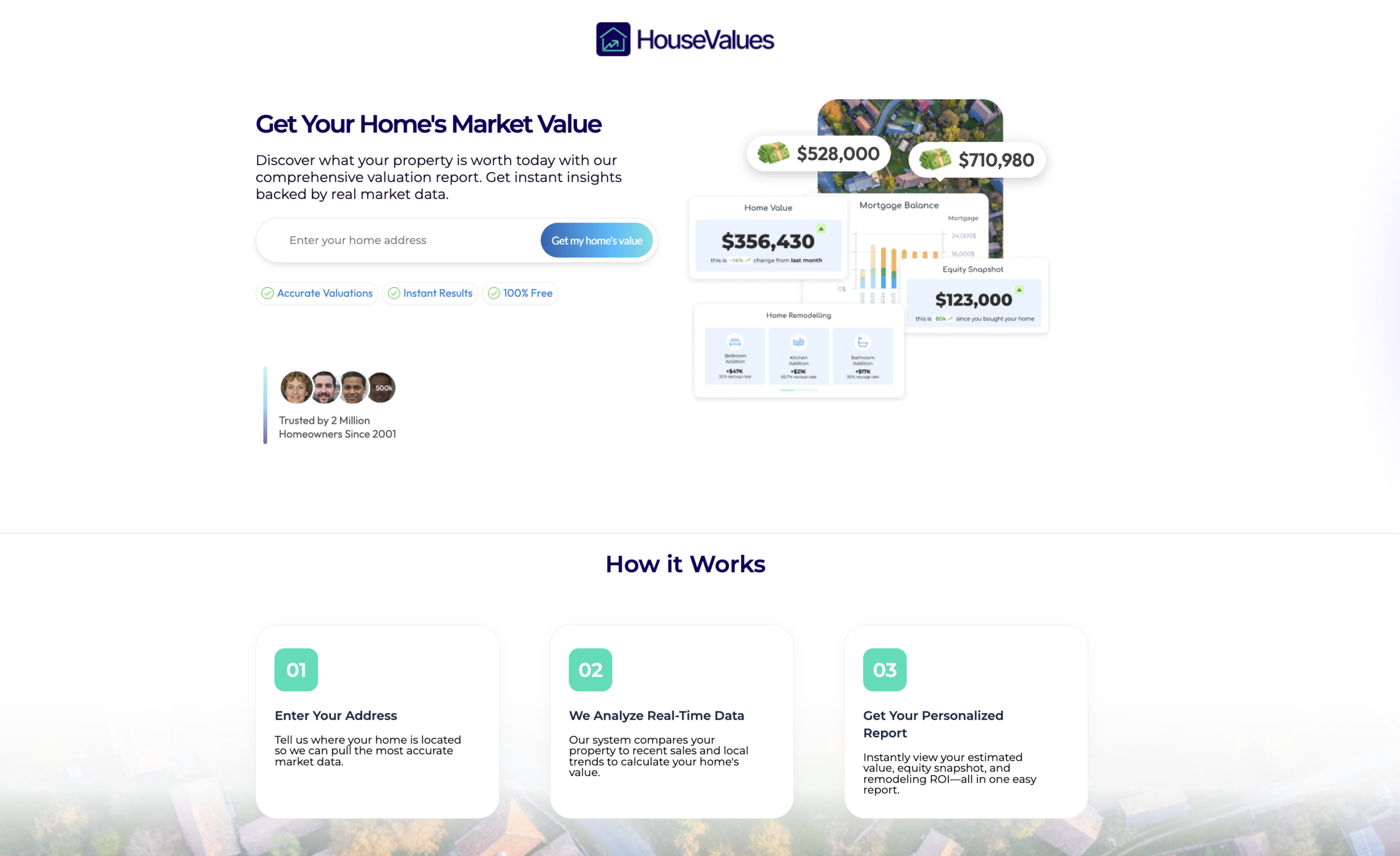
They land on HouseValues.com
The HouseValues.com homepage is built around a single action: enter your address.
They share their contact info
Next, a short form. The address is confirmed at the top. The homeowner is asked for their full name and email (required), along with their phone number, relationship to the property, and selling timeline.
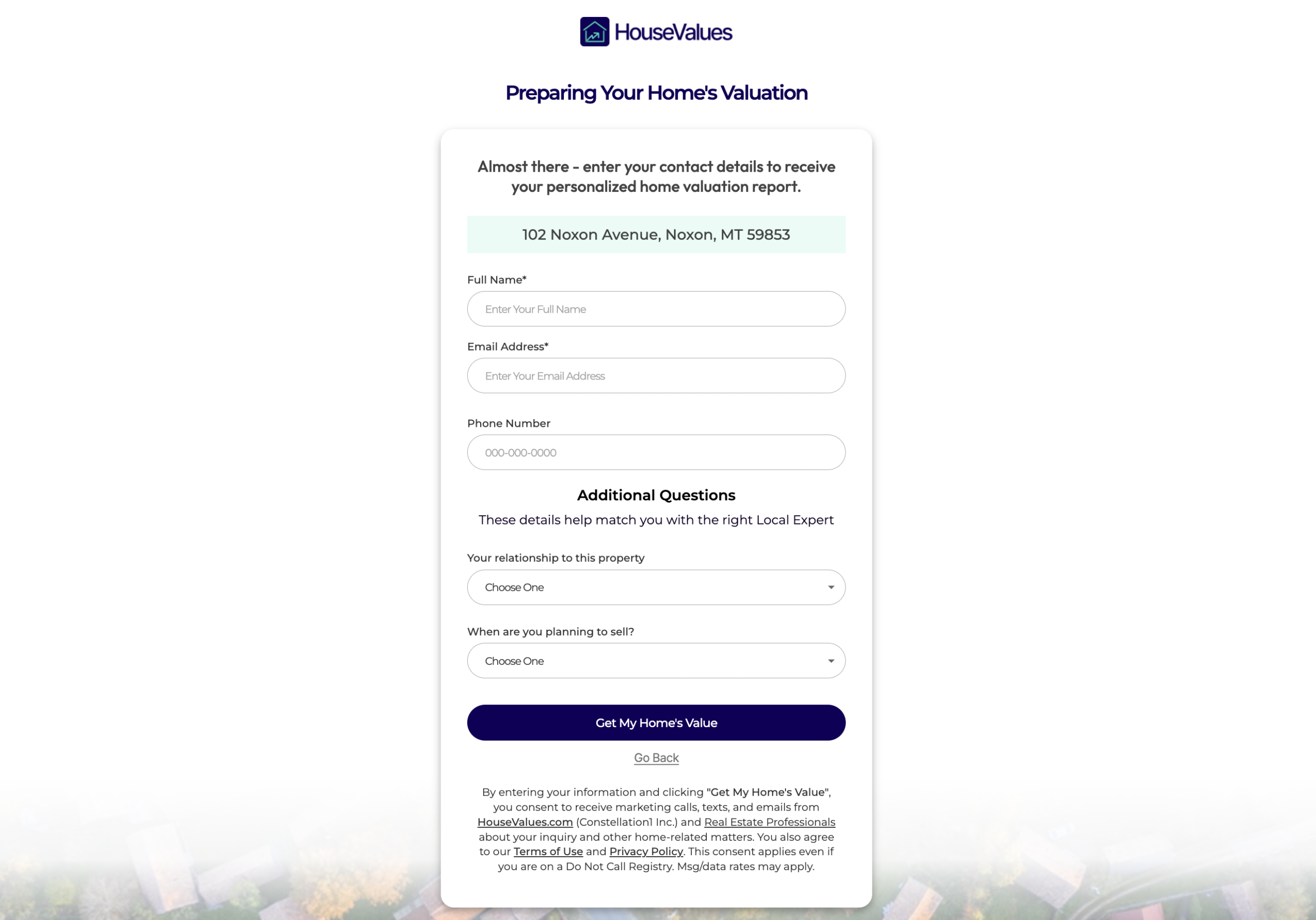
The form sets the expectation upfront: “These details help match you with the right Local Expert.” The homeowner knows from the start they’re being introduced to an agent.
They see their initial value, and meet you
The instant the homeowner submits the form, they land on a personalized results page headlined “You’re All Set! Your Home Value Report Is Ready.”
They see:
-
-
- Their estimated market value with a suggested range
- A teased preview of mortgage balance and remodeling ROI, blurred, signaling there’s more in the full Report
- A “View My Full Valuation Report” button to open the full interactive Report
-
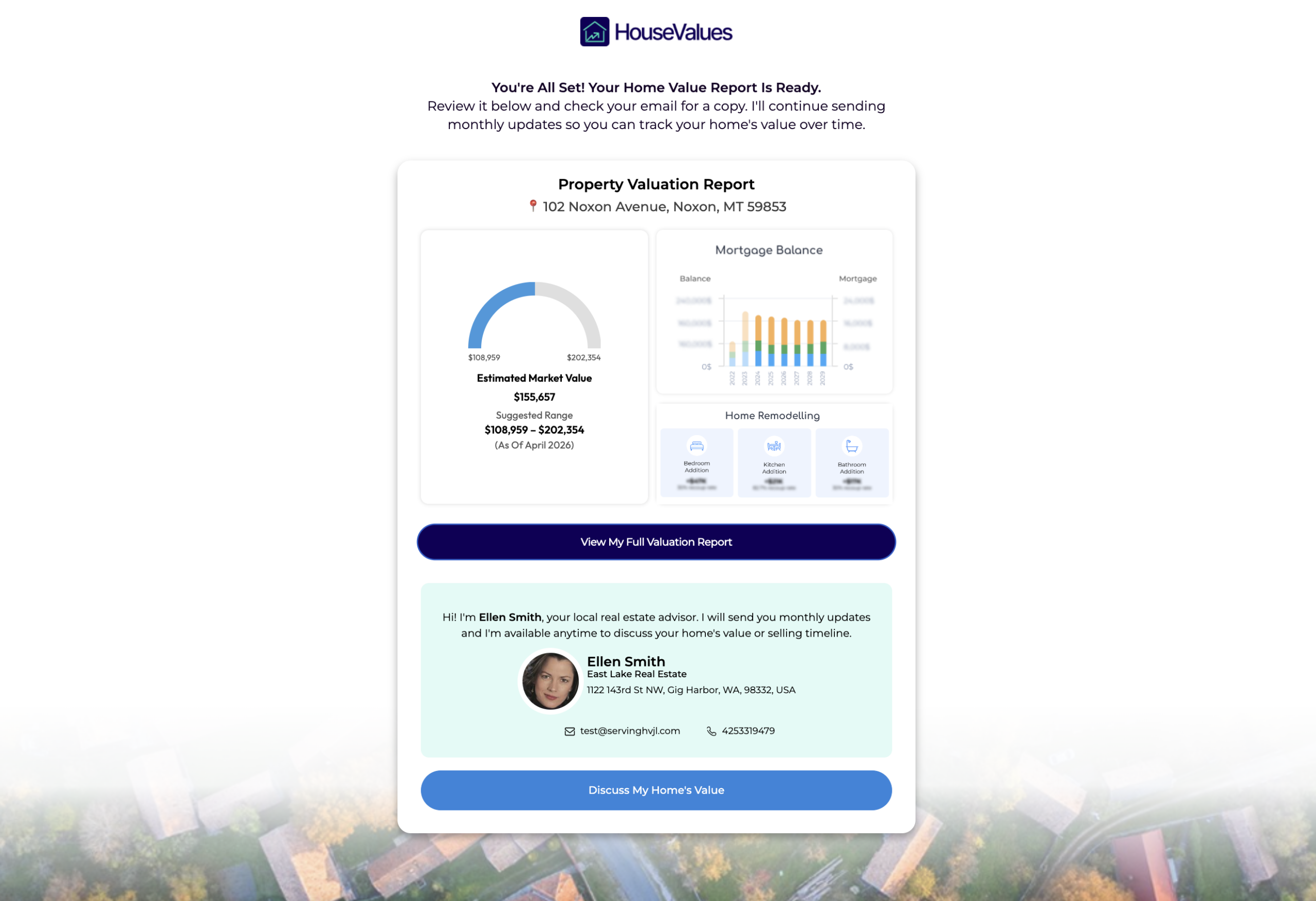
And right on the same page, before they’ve even opened their email, they meet you. Your photo, name, company, and contact info appear alongside a personal message, pulled from your HouseValues Settings in Top Producer. A “Discuss My Home’s Value” button is right there if they want to reach out directly.
Tip: This is why saving your HouseValues Settings matters before your first lead arrives. Your agent details card (name, photo, company, phone, email, website) brands everything the homeowner sees.
They access their full HouseValues Equity Report
The homeowner can open their Equity Report two ways:
-
-
- From the results page, by clicking “View My Full Valuation Report”
- From the welcome email, sent on your behalf moments after registration
-
Either path takes them to the same place: the full interactive Equity Report, the heart of the HouseValues experience.
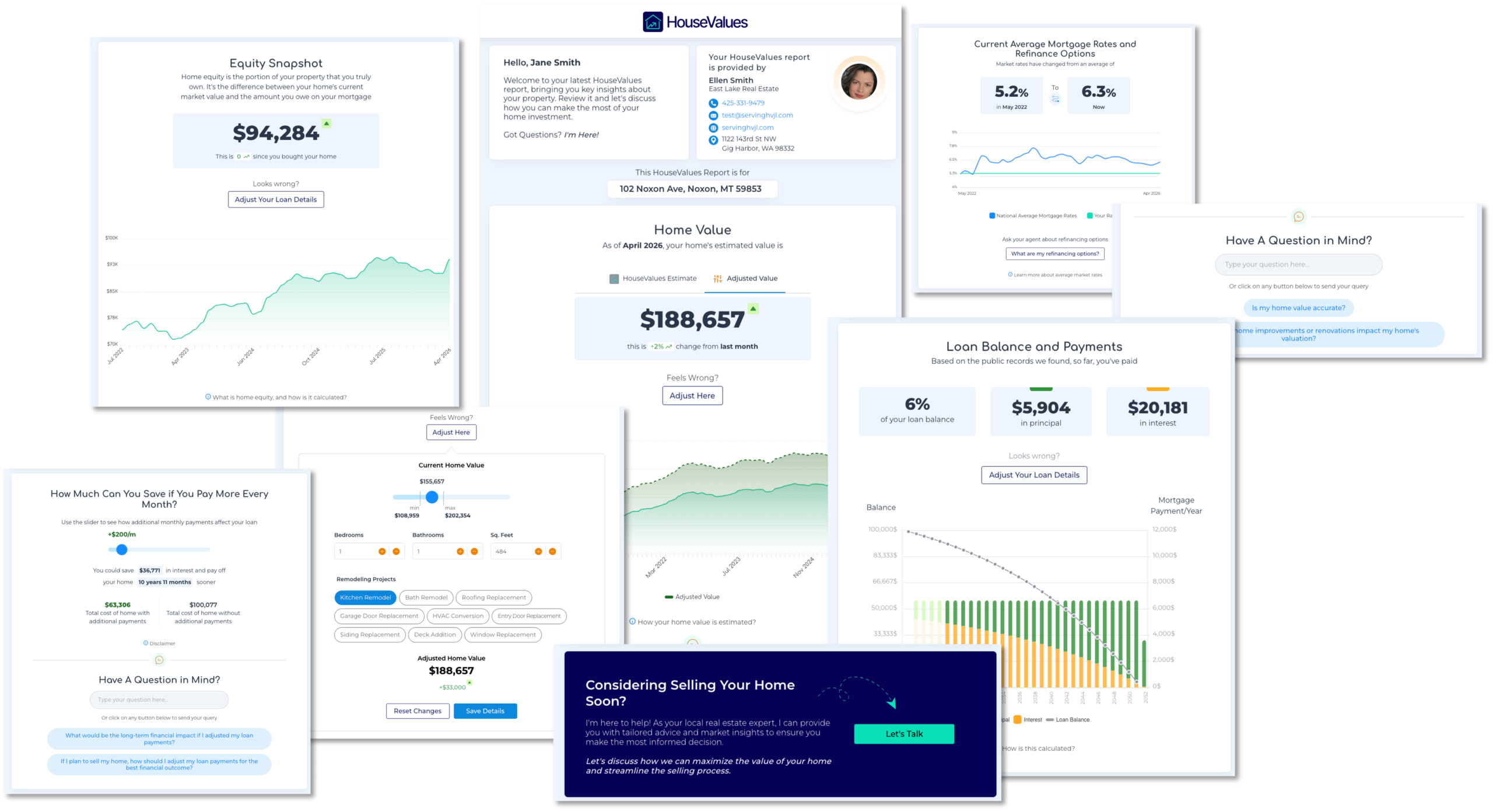
See it in action: Sample HouseValues Equity Report
The Report includes:
-
-
- Current home value, interactive and adjustable by the homeowner
- Equity position, how much equity they have today
- Mortgage breakdown: balance, current rate, payment acceleration scenarios
- Refinance options against current market rates
- Renovation ROI, which home improvements add real value
- Direct Q&A with you, pre-defined and custom questions they can send
- A “Considering Selling” option, so they can tell you when a move is on their mind
-
The Report is agent-branded throughout. Your name, photo, and contact info appear on every section. The homeowner is engaging with their financial picture through you, not through a faceless tool.
Note: Leads include an interactive Equity Report whenever the property data supports one. In a small number of cases, when full property data isn’t available for the address, a lead arrives without a Report. Nothing is lost: this homeowner still asked what their home is worth, and they’re still expecting to hear from a real estate professional. The no-report version of your Lead Response Plan starts right away. Within minutes, the homeowner gets a welcome email in your name offering to put a home value together personally, and Market Snapshot delivers the market data automatically. About an hour later, a call task appears on your Tasks tab. Your first call carries what the Report would have.
The lead is delivered to you
The same moment the homeowner submits the form, the lead lands in your Top Producer CRM and you get an instant email and/or text notification.
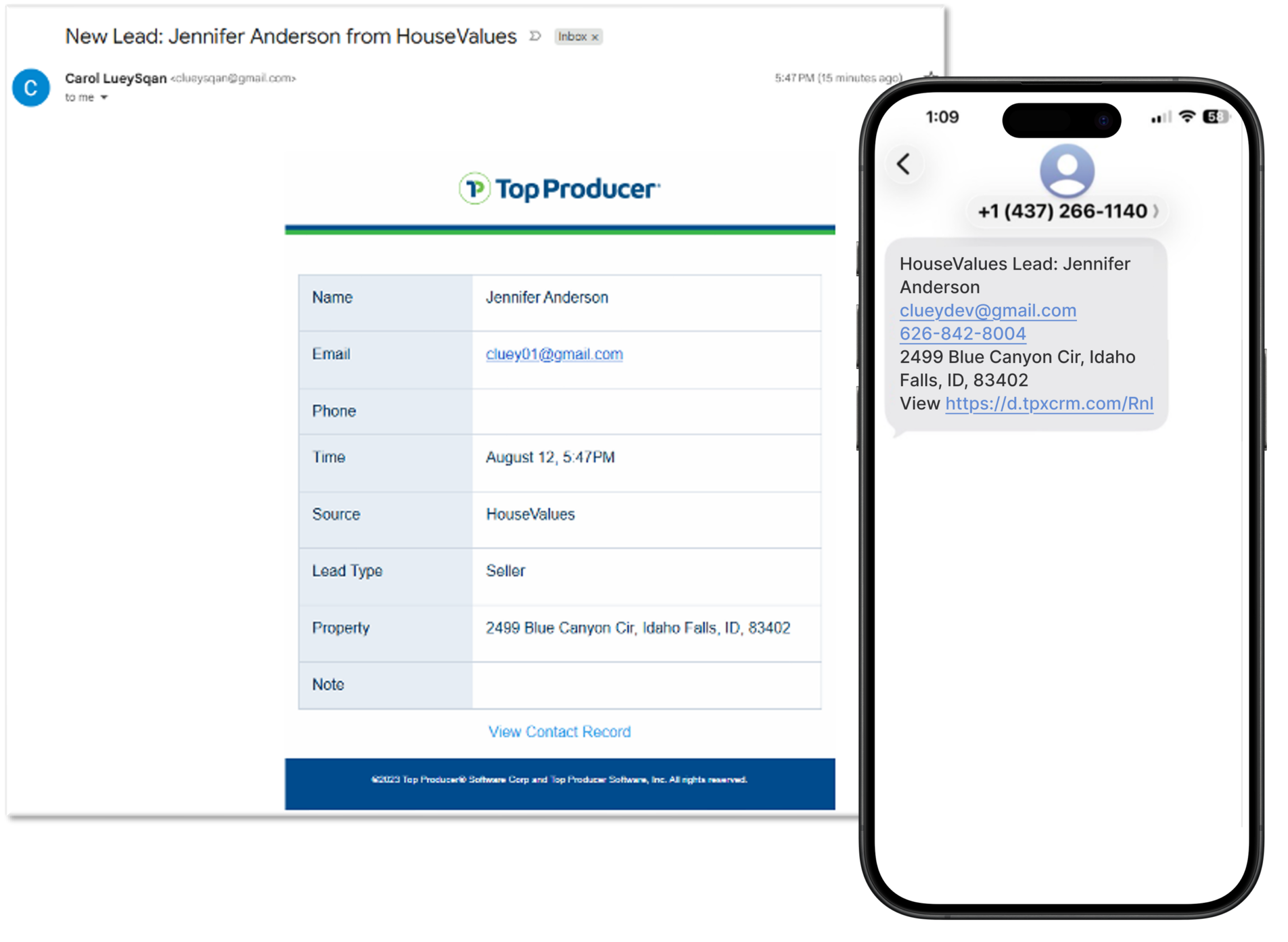
The lead arrives as a full Top Producer contact with Source = HouseValues and Type = Seller, so you can find HouseValues leads anywhere you already look: your Contacts list, your Sales Pipeline, and your contact filters.
Click the lead’s name to open the contact record. This is where the HouseValues experience shows up on your side.
What you’ll see on the contact record (Top Producer X)
-
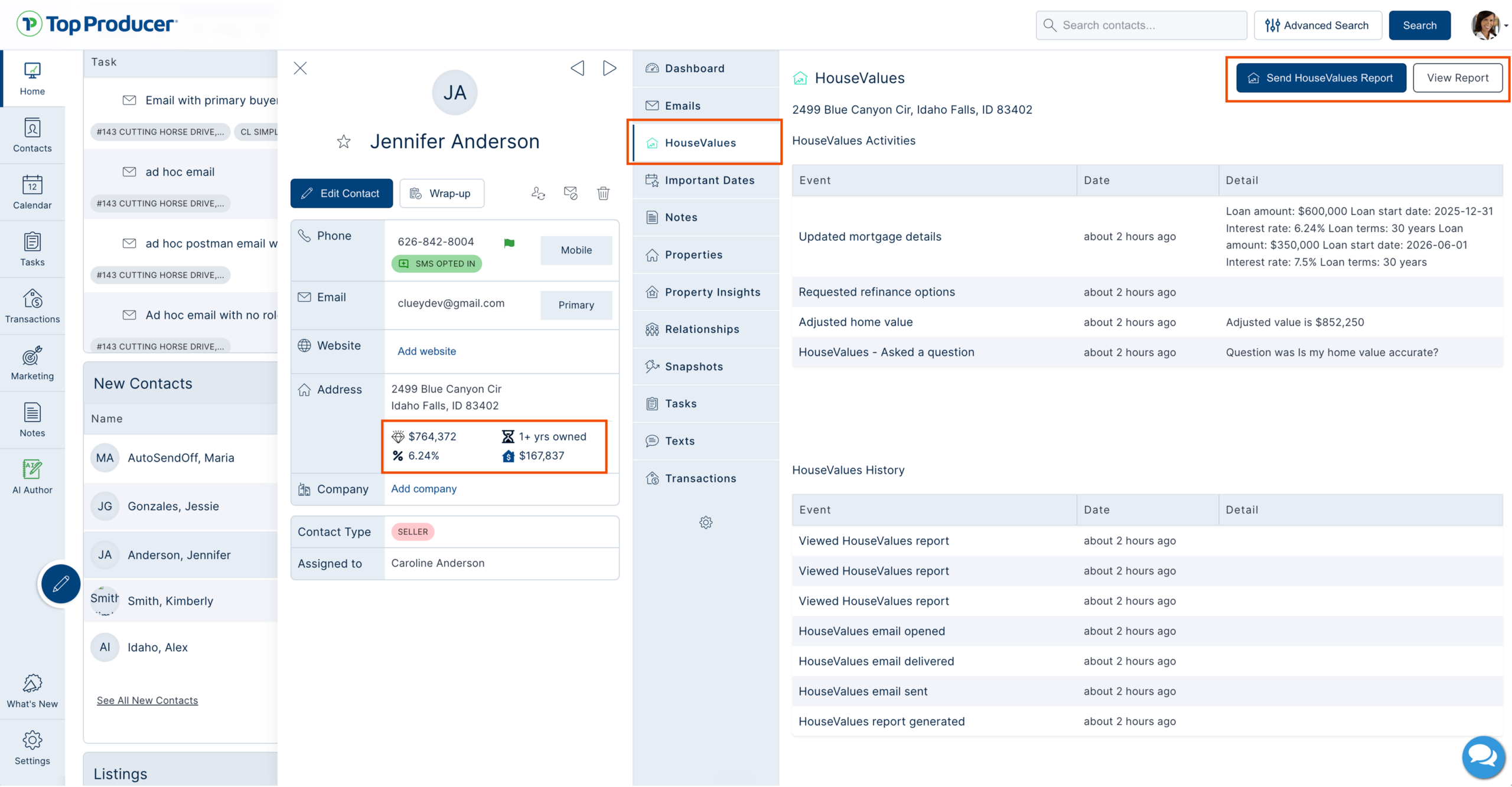
- The contact card. Right under the address, three numbers pulled from the homeowner’s Equity Report: their home value, their equity, interest rate, and how long they’ve owned the home. Contact Type shows Seller, and Source shows HouseValues.
- The HouseValues tab. The property address and the date the next Report is scheduled to go out. Below that, HouseValues Activities lists the homeowner’s interactions with their Report, and HouseValues History logs what the system has done for this lead (Report generated, email sent, email delivered). Two buttons at the top: View Report opens the exact Report the homeowner received, and Send HouseValues Report lets you send it again when you want to.
- The Properties tab. The valuation property, tied to the validated address the homeowner entered.
- The Tasks tab. Your full HouseValues Lead Response Plan, step by step: every email, text, and call, each dated and tagged with the plan name. The calls are yours to make, timed for when they matter. Any other plan you apply to this lead and any tasks you add yourself show up here too, so this tab is the complete picture of what’s scheduled for this homeowner.
- The Snapshots tab. Market Snapshot activity for this contact.
- Notes. The system logs what it does automatically, so you can see at a glance what the homeowner has already received, for example: “An inquiry from HouseValues for 103 East Bannon Creek Road…” Add your own notes here as you go, so what you learn on each call is on the record for the next one.
Top Producer 8i: your HouseValues leads arrive in 8i too, in your Sales Pipeline and Contacts with Source = HouseValues, with the same instant notification. The contact record in 8i holds the lead info, contact details, the property, and Market Snapshot notifications. For the HouseValues tab, the Equity Report, and the signals, open the same contact in Top Producer X.
The follow-up runs on your behalf
The moment a HouseValues lead is created, three things start working, without you lifting a finger:
-
-
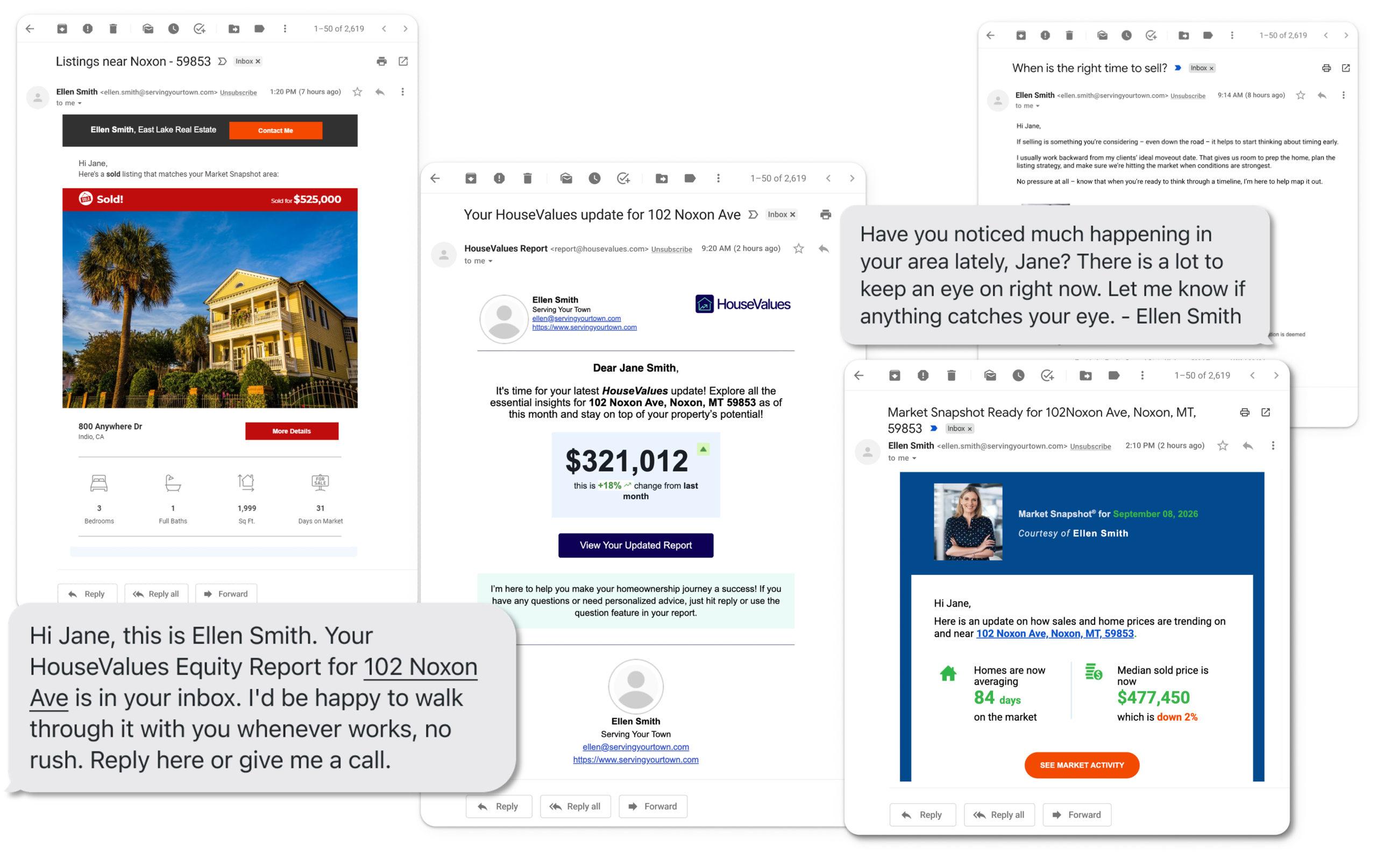
- The HouseValues Equity Report. The agent-branded welcome email with the Report goes out to the homeowner right away, whenever the property data supports one, and the Report refreshes monthly after that.
- Your HouseValues Lead Response Plan. A plan built specifically for HouseValues leads runs the emails and texts on their own and prompts your personal calls as tasks. It comes in two versions, with texting and without. If texting is set up on your account, your leads get well-timed texts alongside the emails and calls. If not, the no-texting version runs, complete on its own.
- Market Snapshot. Included with HouseValues, Market Snapshot sends the homeowner a ZIP-level market update when the lead arrives and keeps it going on its regular cadence. Listing Alerts ride along where your MLS supports them: nearby price changes, new listings, and just-solds, which for a seller are exactly the comps that hint at their own home’s value.
-
Together, that’s 19+ coordinated touchpoints over the first 60 days, depending on your plan, all sent at natural, deliberately varied times, all in your name. When the homeowner responds to any of it, you’ll see it on the contact record and, for the signals you choose, get a notification. That’s your cue to step in.
Tip: Your HouseValues plans live in Task Plan Manager, in the Marketing area. You don’t need to apply them: the right version starts automatically the moment a HouseValues lead is created, whether or not a Report was generated.
Selling-intent signals
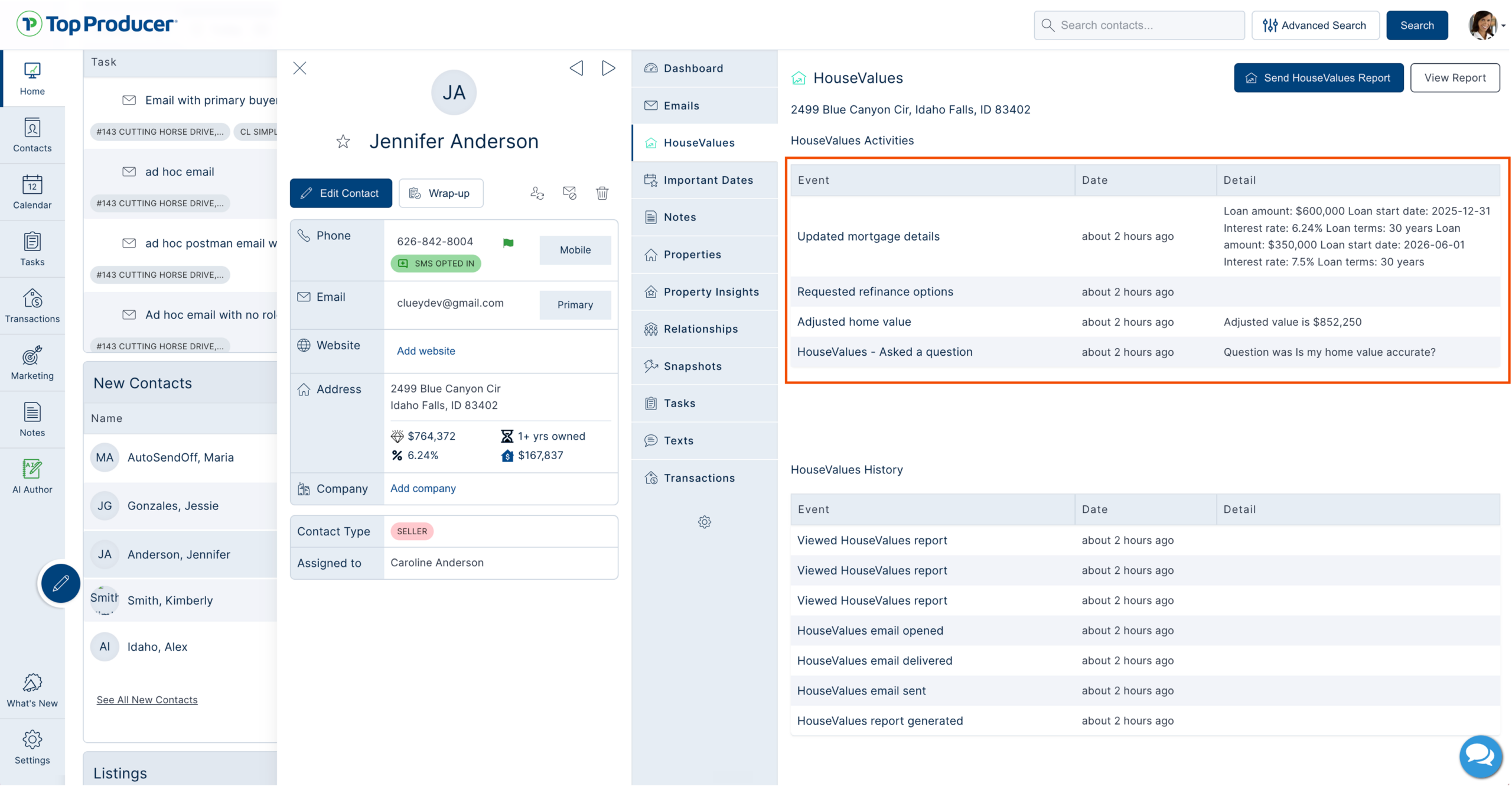
Every interaction the homeowner has with their Equity Report flows back to the contact record as a selling-intent signal. You’ll see signals like:
-
-
- Report viewed, and viewed again, when they keep checking their numbers
- Home value adjusted
- Mortgage details adjusted
- Question asked, pre-defined or custom, sent directly to you
- Contact requested
- Considering Selling, when they tell you a move is on their mind
-
You decide which of these reach you by text or email. Open Settings in the menu on the left, then HouseValues Settings, and pick the notifications worth an interruption. Everything else still lands on the record for you to review.
The signals don’t replace your judgment. They point you toward the right lead at the right moment, when your expertise is needed. A homeowner re-opens their Report three times in a week. Asks you a question. That’s intent. When you reach out, you’re not cold-calling. You’re stepping into a conversation that’s already in progress.
The monthly Equity Report keeps working
The homeowner keeps receiving their refreshed, personalized Equity Report every month, branded to you, for as long as their Report is active. Each month, they (and you) see:
-
-
- Updated home value and equity numbers
- Current market rates and mortgage state
- New questions and conversation prompts directed to you
-
HouseValues homeowners are at a variety of stages in their selling timeline. Some are preparing to list, others are curious about their equity and their neighborhood. The monthly Report keeps you front and center either way, so you’re the one they think of when they’re ready to act.
The math behind this: across HouseValues customers, the average time from lead to closed listing is around 8 months. Some homeowners are 30 days away. Some six months. Some longer. The agents who win stay top of mind through the whole stretch, and the monthly Report makes that possible without you lifting a finger.
Where to find your HouseValues Reports
Every Report sent to your leads is listed in one place: open Marketing in the menu on the left, then HouseValues. From there you can open any Report the way the homeowner sees it.
You can also get to a specific lead’s Report from the HouseValues tab on their contact record:
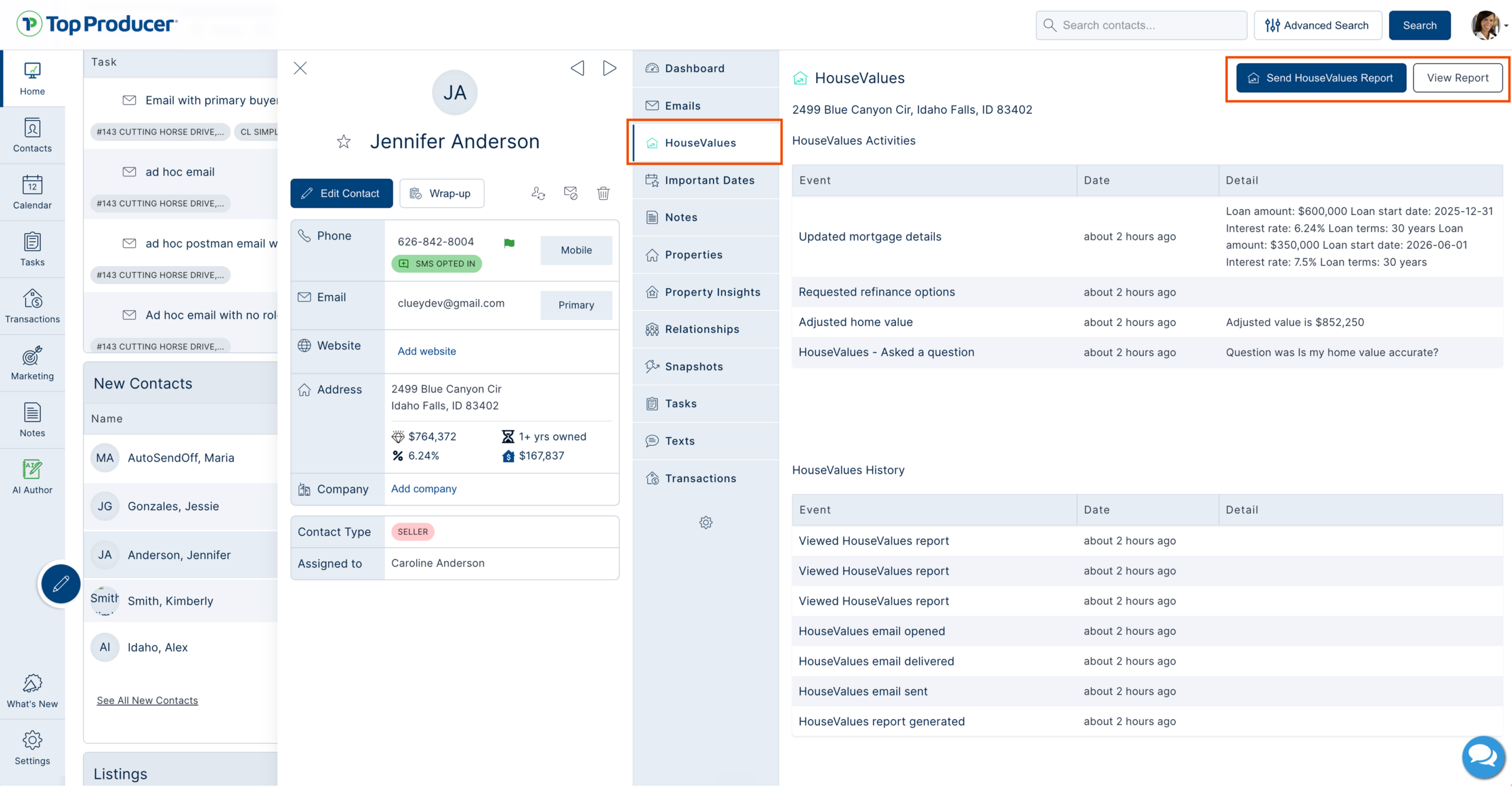
Your best moves at each stage
| Stage | Your best move |
| Lead arrives | Open the contact in Top Producer. Review the Equity Report, the notes, and any activity before you reach out. Walk in informed. |
| First outreach | Reference what you know and what they’ve explored. “Noticed you updated your home’s value to reflect the remodeling work you’ve done. Happy to share other renovation ideas with strong ROI potential if you’re thinking about more updates down the line.” You’re not pitching, you’re picking up a thread they started. |
| A lead arrives without a Report | Introduce yourself warmly, ask about their selling timeline and goals, and start a real conversation. They opted in expecting to hear from a real estate professional. Be that professional. |
| A call task comes up | Make the call. The plan times these for when they matter. Log what you learn in the notes, so the next touch builds on it. |
| No immediate response | Don’t write the lead off. The Lead Response Plan and Market Snapshot are working on your behalf. Let them. Watch the contact record for the next signal. |
| They re-engage with their Report or any of your touchpoints | This is the signal. Reach out within hours, not days. Reference what they did: “Saw you adjusted your mortgage balance. Anything I can help model out?” |
| They ask a question through the Report | Respond directly and quickly. They’ve handed you a conversation starter. |
| They go quiet for weeks or months | The monthly Report is keeping you visible. Keep adding occasional personal touches: local market notes, a quick check-in. |
| They tap Considering Selling | This is the moment. Move to a phone or in-person conversation as fast as you can. |
The system creates the opportunity. You convert it. HouseValues hands you exclusive seller leads, real homeowner intel, and follow-up working on your behalf around the clock. What only you can do is step in: engage with the signals, follow up with relevance, and show up at the moments that matter. That’s where listings come from.
Want to learn more or explore additional lead volume/newly available areas? Reach out to Customer Care at support@topproducer.com.